Sharing
There are two different things to share, each in its own file: a Snapshot (.ssnap) to show another operator a moment of your network, and the whole project (.sscope) to work the same network from another PC.
Sharing a Snapshot: the .ssnap
Any Snapshot in the history can be exported as an .ssnap file with the Share snapshot (.ssnap) button on its card. The other operator opens it with their SignalScope, by double-clicking it or from the Welcome screen, and lands in viewer mode: they see that moment's tables (stations, APs, diagnosis, even the map if the Snapshot carries it) and can generate reports. Nothing else: the viewer does not scan, open sessions or touch your network.
The .ssnap carries no secrets: it never contains radio credentials or keys. That is why opening it asks for nothing.
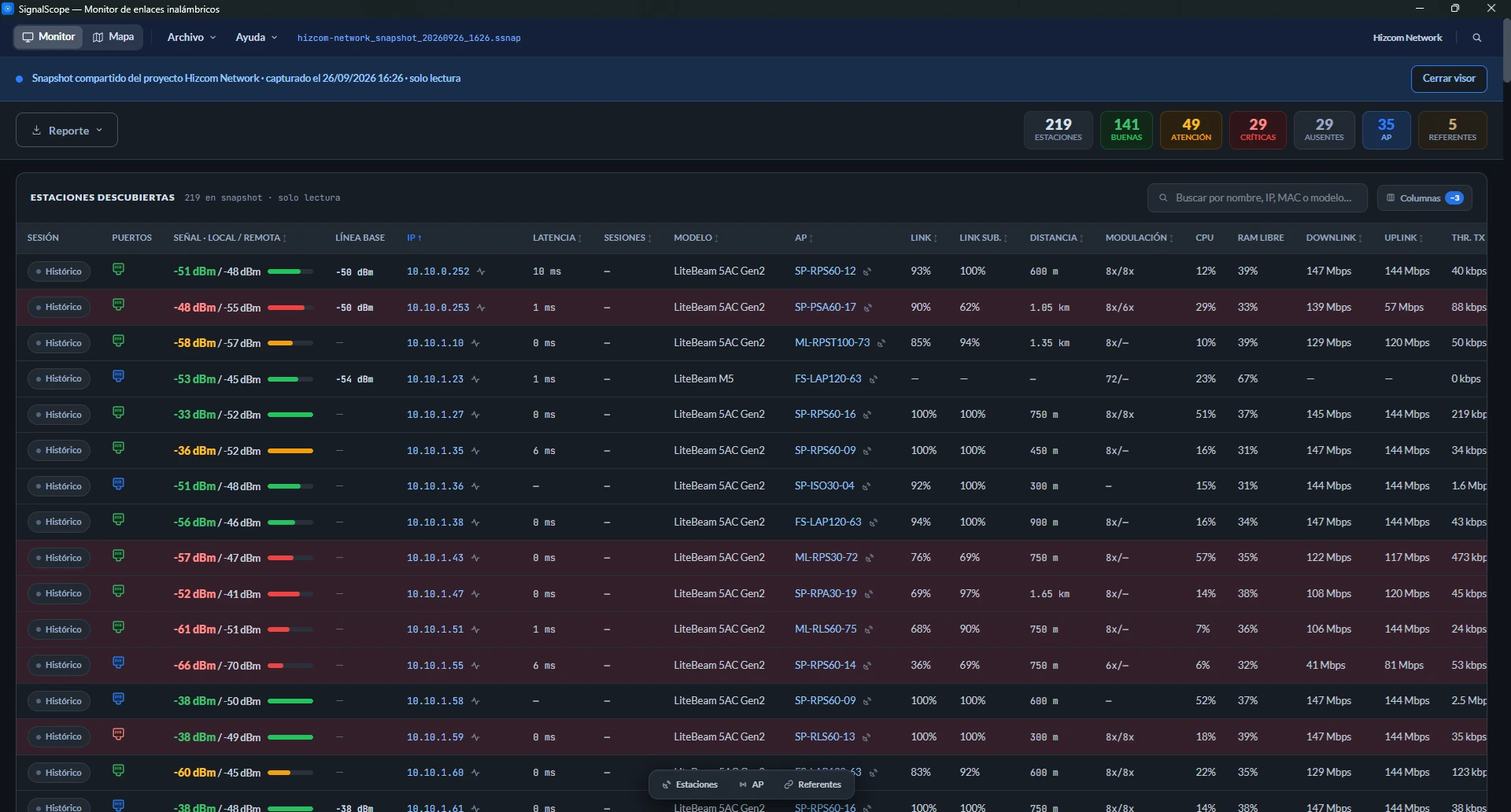
Protecting sensitive data
No secrets does not mean no data sensitive to your business: IPs, MACs, customer names, the size of your network. In File → Security, on the Snapshots tab (Snapshot privacy), you mark which fields are private, separately for Stations and for Access points · AP. When you protect a Snapshot, that data is trimmed in the file itself, and what is not in the file cannot leak:
- IPs and names are trimmed (
10.•.•.20,tal•••). - The MAC is hidden almost entirely, because its first pairs give away the manufacturer.
- Model, firmware and the station count are removed.
Devices in References follow the same switches as stations. If you trim the MAC or remove the model, their vendor disappears too.
There are two ways to protect. The padlock on a card protects a Snapshot that already exists (it stays disabled until you mark at least one private field). The Apply when creating new Snapshots switch makes every new Snapshot born protected. The trim is permanent: the confirmation notice warns about it and offers Create an unprotected copy first, which stays in your history with its full data. If the history is full, that copy does not fit and the switch appears disabled.
Location is handled separately. If you check the option not to record location, coordinates are not trimmed but removed, and that Snapshot is shared without the Coverage map.
Sharing the project: the transfer code
The .sscope stores your radios' credentials encrypted and anchored to your PC. Copying the file to another machine does not expose them: there the project opens, but without credentials. For another PC (yours or a trusted colleague's) to work the full project there is the transfer code:
- On your PC, open File → Share project… and read the code (format
XXXX-XXXX-XXXX). Every project is born with one, and the modal saves the project before showing it so the file is up to date. - Send the
.sscopefile however you like, and the code through another channel (a call, a separate message). - On the destination PC, opening the file asks for the code once. From then on that machine is linked and opens the project normally.
Moving your project to a new PC follows exactly the same steps.
Formatting also counts as changing PCs
When you format, the local key is lost along with Windows and your own PC becomes "a new PC": the project will ask for the transfer code. Write it down before formatting, because without it the file does not open.
If the code leaked
Regenerate code invalidates the previous one on the spot: files you already shared can no longer be unlocked with the old code. Anyone who already opened the project on their machine with the old code keeps that access.
The protected file does not half-open
An .sscope that asks for a code shows nothing until you enter it. Credentials always travel encrypted: neither whoever intercepts the file nor whoever receives it without the code can read them.
Which one to send?
| You want to… | Send |
|---|---|
| Show the network's state, ask for a second opinion | .ssnap (protected if it leaves your trusted circle) |
| Have a colleague work your network: scan, monitor, sessions | .sscope + code through separate channels |
| Move to a new PC | .sscope + code (and release the license on the old PC; see Installation) |